Have you thought about having satellite TV in your travel trailer? Many times, folks at campgrounds have approached me to ask how easy or hard it is to set up.
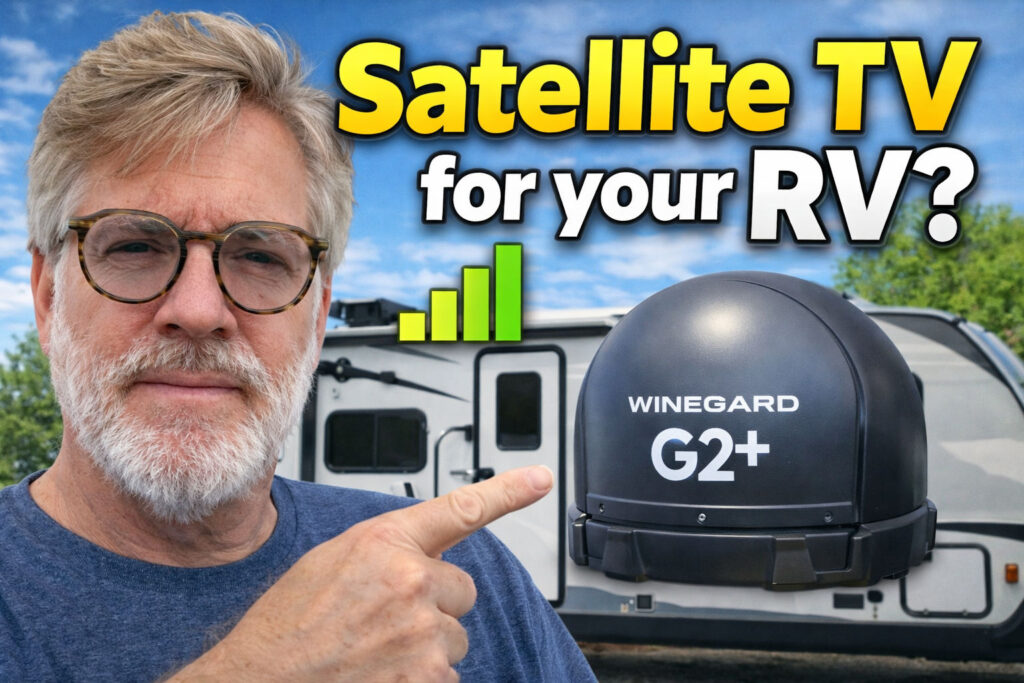
There are definitely things you need to think about before you decide that Satellite TV might be great to have in your RV. Let’s talk briefly through some considerations:
- Do you have a Direct or Dish satellite service already at home? This will be the only economical way to have it in the trailer unless your full timers and that is your primary home service. For instance, if you already have dish at home, then your monthly charge to add a Wally to your rig is $5.00/month per receiver. You can also pause your Dish receiver and stop paying while you store your unit. You can also suspend your service with DirecTV as well for up to 9 months. DIRECTV is $7.00/month per receiver if you already have it at home.
- What satellite dish manufacturer will you choose? – This matters because satellite dishes may be exclusive to a TV service provider. In other words, a satellite might only work for a single provider like Dish or Direct TV. This prevents you from choosing a new provider without buying a new satellite dish. Our satellite dish works for three different providers., Dish, Direct TV, and Bell. We started with a Direct TV contract and now have been with Dish for many years.
- Where are you planning on mounting the dish. Portable vs fixed location. You need a clear view of the southern or southwestern sky. If you mount it on your roof, trees and poor orientation toward the southern sky will likely prevent you from always getting satellite TV.
- Are you planning on using satellite tv on more than one TV in your rig? Some satellite dishes only have one input, others have two. You might save money by buying a one port satellite, but if you have a second tv that won’t work. You might think you can use a splitter, but that won’t work, at least not with Dish. However, you could buy a second dish, and there goes your savings. It’s much better to pay a little more for a two-port satellite.
- Auto find vs. Aiming your dish. Some require manual pointing other will auto find the satellite – sort of. More about that in a minute.
- Local channels are a different animal. Local channels like CBS, NBC, ABC, and local FOX, are only available in your zip code. I actually got my local channels outside my home area code, but I never got them outside of Texas. When I leave Texas, I no longer get my local channels. Then we use air tv for local channels. There is a nasty work around for calling and updating your zip code, but it will screw things up at home. That is due to recordings being different in the new zip code than ones you have programmed in your home zip code.
- Get frustrated easily? There’s a lot of things to remember if you’re having issues. If you get frustrated easily, this may not be for you.
- Support from either of these companies (Dish/DirecTV) is not great. I can’t tell you how many different stories I’ve gotten regarding the same technical issues. I’ve had – and you will have them too, if my experience is normal.
- You will need to refresh your signal if you don’t use your satellite every 2 weeks. That is done via the dish outdoors section of mydish.app.
Alright so that’s the considerations part of the discussion. Now lets talk about the reality of hooking up the dish.
First let’s talk about the location of the power inserter if you’re using a Winegard antenna.
The max amount of coax from the power inserter cannot exceed 50’. Why is this important? Because if you plug the power inserter at your tv location, the coax from there to your satellite tv connection in your storage area will add to the 50’ maximum and you will not get a satellite connection. That’s why I connect at the outdoor storage location. Now you can plug in at the tv and then use a 25’ cable at the satellite tv connection in storage. However, that will limit your flexibility for finding a good clear sky.
Once you have the satellite connected it is just a matter of aiming it fairly correctly to begin with. Even auto find satellite features like the G2+ require a pretty close approximation of aiming. There are apps to help you aim your dish. There is an App called “Dish Align”. If you have DirecTV, or Dish, you can use this app to aim your satellite dish.
Then it’s time to go fire up the power inserter and go in your trailer. If you don’t get a signal to begin with, lets talk about possible issues.
- You haven’t used your satellite dish in two weeks. Then you need to access your app or call your tv provider and have them refresh your signal. This is true for Dish, but I have no idea if DirecTV is the same situation. Once you get a refresh of your signal, you should wait 15 minutes before proceeding.
- If you don’t have your satellite aimed correctly, you will not get any cannels at all either. You may get a message that tells you that you have “Complete loss of signal”. Just make sure you have a nice open view of the south/south western sky.
- In the case of Dish, if you only get channels on one satellite (110 or 119) but both satellites are checked as being received then the Wally has locked onto only one satellite. You must unplug the Walley, wait a few minutes, and then reconnect and start over.
- I typically go to the Wally menu to check system switches, if I have an issue. Do that through the Wally menu on the TV by pressing the little house icon on the Dish remote three times. That takes you to the diagnostic scree. Now scroll down to “Dish” on the bottom of the left side and press enter. Now scroll to the top right of the screen and highlight the Test Installation button and press enter. The Dish will now look for satellites again. This process can take at least five minutes to run. When it is finished it will list received satellite signals with a blue checkmark.
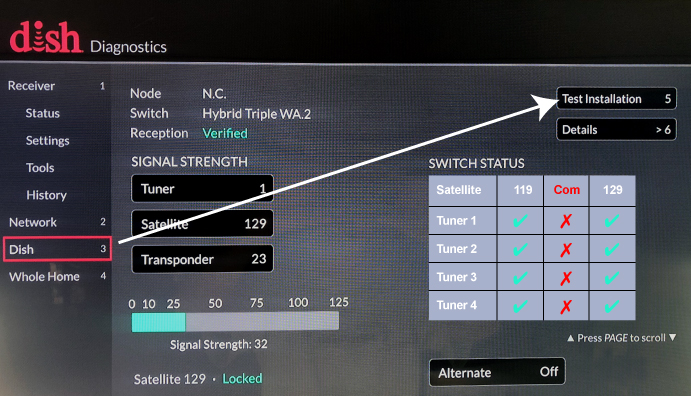
If you don’t get any satellites, then it’s back to the drawing board. Check your cable connections. Make sure your power inserter is plugged in and turned on (you should see four green lights if you hooked it up correctly). Then ensure you aimed your dish correctly and keep it free of obstructions.
If you continue to struggle you can call your outdoor service provider and get some support. However, the support I’ve had has been less than stellar. You might get lucky, and they do try to help, but sometimes they don’t seem to understand the basics.
Now for the sake of argument let’s pretend that you have satellite TV working and you want to use the second TV. If you only have one connection at the dish, you will need to disconnect the Wally from your current tv and move it to the second TV. If you have a second connection at the dish for a second Wally in your trailer you will need to do the following.
- Start up the new wally.
- Run the test installation procedure on the second Wally. Your primary satellite TV will be unaffected while you do this.
After that runs, it picks up the channels from the satellite that provides the primary TV’s current programming. The primary satellite TV can only read one satellite at a time. So, let’s say you turn to channel 39 and that is on satellite 110. The outdoor Wally can only use channels on 110 and cannot switch to any channels on the other satellite (in my case 119).
If you want to watch channel 40 and it happens to be on satellite 119, then you need to change the inside TV to channel 40, go back outside and run the test installation procedure again to pick up those channels. Confused? Just think of the indoor primary Wally TV as being the brains of the system. The outdoor second Wally is dependent on the primary Wally for programming.
Although this sounds like a lot of work, you can get the outside TV online in just eight minutes after you finish setting up inside.
Remember not all campgrounds are satellite friendly. Trees and other obstructions (like close neighboring trailers) will prevent you from getting a signal. In some cases when there are obstructions you may only pick up one satellite. Then you will need to decide if maybe air tv is a better choice for that stay.
I said this may not be for you if you get frustrated easily, and now you know why.
It’s really nice to have on longer stays at a campground. It may not be worth going through all of this for a two-night stay but that would be your call. We really like having it.
Share this post:




Leave a Reply