If you travel with a Dish Outdoors satellite setup, then sooner or later you will probably run into a situation where everything appears to be working correctly, yet you still cannot receive all of your channels. Unfortunately, that is exactly what happened to us during our recent trip to Caprock Canyons State Park. At first, I assumed there was a problem with satellite 110 reception. However, after spending considerable time troubleshooting the issue, talking with Dish support, and ultimately piecing the information together myself, I discovered that the real problem was far more nuanced. In fact, the issue had nothing to do with my equipment at all. Instead, it involved the difference between local SPOT beam channels and national CONUS beam channels.
Therefore, in this post, I want to explain what I learned, why the Dish error messages are so misleading, and, most importantly, how you can quickly determine whether your setup is actually working correctly before wasting hours chasing the wrong problem.
The Frustration
After our trip to Caprock Canyons State Park, I learned something new about Dish Outdoors and how the satellites work. Unfortunately, one thing that never surprises me is that the support folks know less than me. Frankly, that should never be the case. I am not sure if they just don’t have a good script to follow, or if they simply don’t know the right questions to ask. Either way, this has been an ongoing problem ever since we have used satellite TV in our travel trailers for 10 years or so.
Since I did a video about satellite TV not long ago, I wanted to add what I learned on this trip. As you probably know, there are many things that can derail your setup. Because of that, I wanted you to have all the information, especially since I missed this in the video. So, here is the scenario that you may encounter:
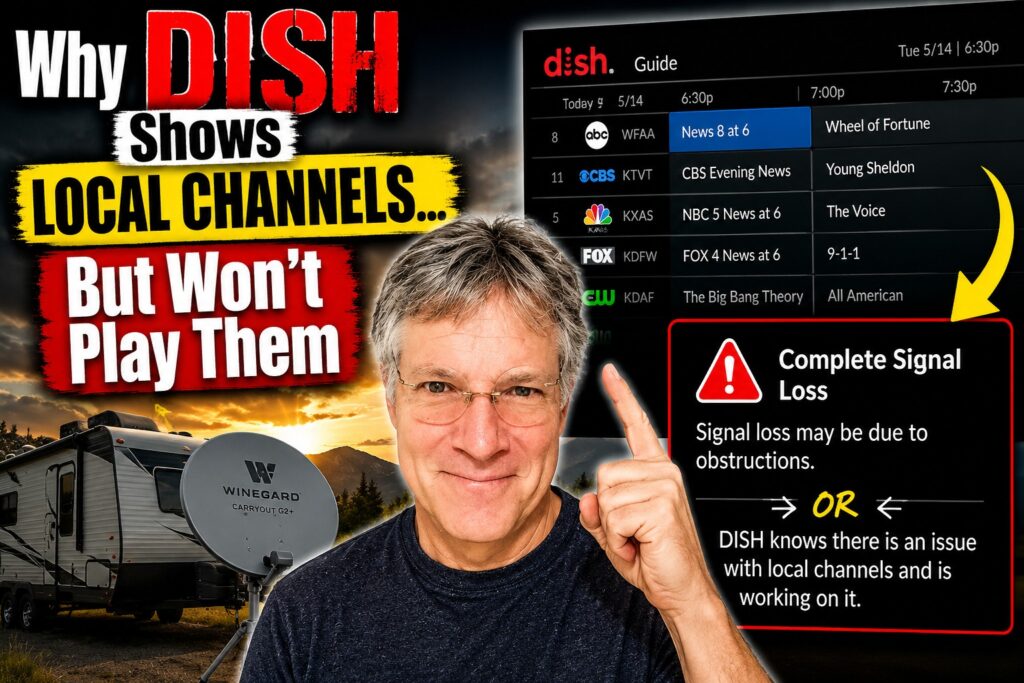
You connect your receiver and run the test switch process, and then you see your local channels still listed in the guide after you boot up. In fact, the DISH Guide even shows what your local channels are televising (the channel description). However, once you select a local channel, you will get a blank screen along with one or two messages. First, one message will incorrectly tell you that something is obstructing the signal. Of course, you will know that is incorrect because the receiver checks that both satellites are received. Meanwhile, the other message will tell you that “Dish knows there is an issue with local channels and is working on it”. Unfortunately, both of these messages are misleading. Instead, a more helpful message would be something like, “National Channels are only available in this area.” Certainly, that would have helped me out a lot!
However, let’s talk about what is really going on in this case and what I learned. First of all, keep in mind that we have traveled many times far away from our home zip code and still received local channels. In fact, Dish subscribers can typically travel 150–300 miles from their service address before local channels become unreliable or disappear. Up until now, that has certainly been our experience, and that is exactly what sent me down a rat hole. So, with that in mind, let’s clear things up.
However, first a quick word about the Dish satellites:
- Satellite 119 = The majority of core legacy national programming.
- Satellite 110 = Some additional nationals + local channels.
There are actually two beams that Dish sends to your outdoor dish on satellite 110 (remember, you also receive satellite 119). First, there is a SPOT beam for local channels, and then there is a CONUS beam (Continental United States Beam) for national channels. Once you travel far enough away from your home zip code, the spot beam no longer delivers your local channels. However, despite that fact, it still sends the channel lineup information to the Dish guide.
The important takeaway here is that, even though local and national programming physically originates from the same satellite position (110°), they are transmitted differently. As a result, it is a nuance that can make things surprisingly frustrating.
This is exactly why I was so frustrated. I was getting all the channels associated with satellite 119. Therefore, it seemed like I wasn’t able to receive any channels associated with satellite 110. However, that is where I made my mistake. In reality, I was getting all the national 110 channels, just not the local ones.
What would probably help in situations like this would be a complete list of channels carried on satellite 110. That way, you could quickly determine whether you are truly missing the satellite or simply missing the local spot beam channels. In our case, these would be the local channels for satellite 110 based on my zip code:
| DISH Guide Channel | Station | Network | Local |
|---|---|---|---|
| 8 | WFAA | ABC | ✅ LOCAL |
| 11 | KTVT | CBS | ✅ LOCAL |
| 5 | KXAS | NBC | ✅ LOCAL |
| 4 | KDFW | FOX | ✅ LOCAL |
| 33 | KDAF | CW | ✅ LOCAL |
| 21 | KTXA | Independent | ✅ LOCAL |
| 13 | KERA | PBS | ✅ LOCAL |
| 27 | KDFI | MyTV | ✅ LOCAL |
| 23 | KUVN | Univision | ✅ LOCAL |
| 49 | KSTR | UniMás | ✅ LOCAL |
| 39 | KXTX | Telemundo | ✅ LOCAL |
| 68 | KPXD | ION | ✅ LOCAL |
Here are the National Channels for satellite 110 and my zip – They would still transmit because they are CONUS.
| DISH Channel | Network | National Channel |
|---|---|---|
| 112 | HLN (Headline News) | ✅ NATIONAL |
| 125 | FXX | ✅ NATIONAL |
| 129 | Bravo | ✅ NATIONAL |
| 130 | Hallmark Channel | ✅ NATIONAL |
| 133 | IFC | ✅ NATIONAL |
| 187 | Hallmark Mystery | ✅ NATIONAL |
| 192 | Investigation Discovery | ✅ NATIONAL |
| 202 | HDNet Movies | ✅ NATIONAL |
| 401 | Golf Channel | ✅ NATIONAL |
| 105 | USA Network | ✅ NATIONAL |
| 107 | A&E | ✅ NATIONAL |
| 120 | HGTV | ✅ NATIONAL |
| 140 | ESPN | ✅ NATIONAL |
| 139 | TNT | ✅ NATIONAL |
| 300 | HBO East/West feeds | ✅ NATIONAL |
| 318 | Starz feeds | ✅ NATIONAL |
| 327 | Showtime feeds | ✅ NATIONAL |
Finally, here’s what you should do instead of jumping to conclusions like I did. First, don’t assume that the guide is indicative of what you will actually receive on your TV. Instead, check the CONUS channels, and then you will know for sure whether your satellite dish is receiving satellite 110 programming.
I just wanted to share that information here because it caused me considerable frustration. Unfortunately, the Dish Outdoors folks were totally clueless about what was actually going on. As with just about everything else I have learned about Dish, I have mostly had to figure it out on my own.
You would think that the Dish support folks would immediately say, “Let’s check some non-local channels that exist on CONUS 110.” However, that never even came up. Instead, the representative offered the following explanations:
The representative told me I probably needed a signal refresh, although I knew that wasn’t true because I was already receiving channels from satellite 119.
In addition, the representative suggested that I might have an internal trailer wiring issue. Again, I knew that wasn’t the case because satellite 119 was coming in just fine.
Finally, he suggested that my satellite dish itself was not working. However, that explanation made even less sense. After all, why would I still be receiving satellite 119 if the dish wasn’t working?
The long and the short of it is this: with Dish, or really any outdoor satellite provider, you are pretty much on your own. Unfortunately, that is just the way it is.
Hopefully, this information helps. After all, many folks I have talked to have expressed incredible frustration with their satellite reception, some even to the point where they want to cancel the service altogether. That is exactly why good support is so important. Unfortunately, however, it is also something that Dish still does not seem to have a handle on.
Share this post:





Leave a Reply